 Activity Cleaner
Delete old posts in bulk, by date
Pick a date range, review every post it finds, untick the ones you want to keep and delete the rest in one go.
- No password needed
- Free to start
- Cancel anytime
What it does
- Choose the years that go. Set a From and To date, or tap a quick range: last 30 days, 12 months, this year, last year or all time.
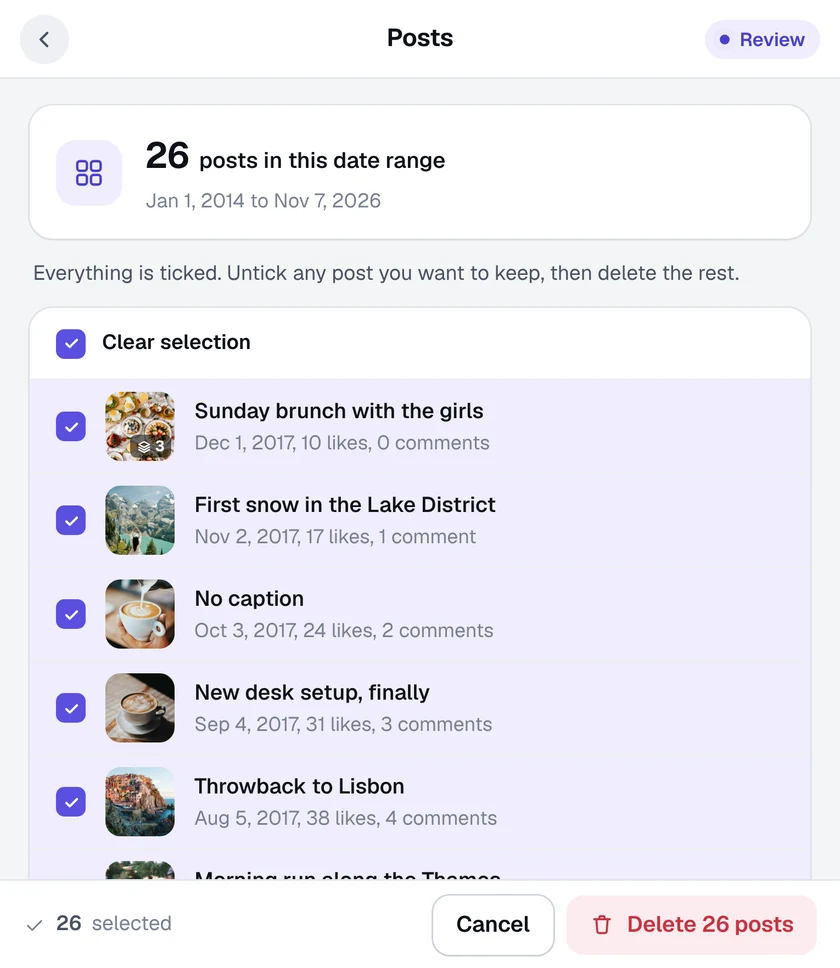
- Review before anything changes. Every post in the range is listed with its date, likes and comments. Untick anything you want to keep.
- A pace that suits you. Pick the removal speed, with a safety pause between batches. Stop at any time.
- A record of what went. Export a list of every deleted post when it finishes.

How it works
- 1
Open your profile
Go to your own Instagram profile in Chrome and open Activity Cleaner, then Posts.
- 2
Pick the dates
Choose a date range. Posts from those days are found, including both end days.
- 3
Review and delete
Untick posts to keep, then press Delete. Progress shows on the Instagram page.
Questions
Can I get deleted posts back?
No. Instagram doesn't offer an undo for deleted posts, so Activity Cleaner always shows you the full list first. You can also export it before you start.
Does it delete Reels and carousels too?
It deletes the posts shown on your profile grid that fall in your date range. You see each one in the review list before it goes.
Can I archive instead of delete?
Activity Cleaner deletes. If you'd rather hide posts, use Instagram's own Archive option on each post.
More tools in Activity Cleaner

Ready when you are.
Add Activity Cleaner to Chrome, open Instagram and pick a tool. Your first 25 removals are on us, every day.